
Resources
Presentation Creation


Skywork AI has been gaining traction as part of a new wave of agentic AI platforms, tools that promise to handle almost any task from a single interface. If you’ve been using it for presentations and wondering whether there’s something better, or if you’re evaluating Skywork AI alternatives before committing to a tool, you’re asking the right question.
The short answer: for presentations specifically, there are significantly better options.
Skywork AI is a capable general-purpose workspace, but “capable across many things” is not the same as “built for presentations.” There’s a meaningful difference between a tool where slide generation is a core product and a tool where it’s one item in a menu of eight. That difference shows up in generation speed, design quality, content accuracy, and how much editing you’re doing after the AI finishes.
This guide covers the best Skywork AI alternatives for teams who need AI-powered presentation tools that actually deliver, not just tools that technically include a slides feature. We’ve evaluated each option across the dimensions that matter most for presentation work: how fast it generates, how good the output looks, whether the content is accurate, and how much work you’re left doing after the AI stops.
We also tested the leading contenders with the same real-world prompt to see how they perform side by side. The results were clear.
We tested five tools with the exact same prompt — “Design a compelling real estate listing presentation highlighting location benefits, amenities, investment potential, and comparative market data” — to see how each handled a real-world presentation task. The results were revealing. Most tools in this comparison are agentic AI platforms that include presentation generation as one capability among many. They weren’t built for this. And it shows.
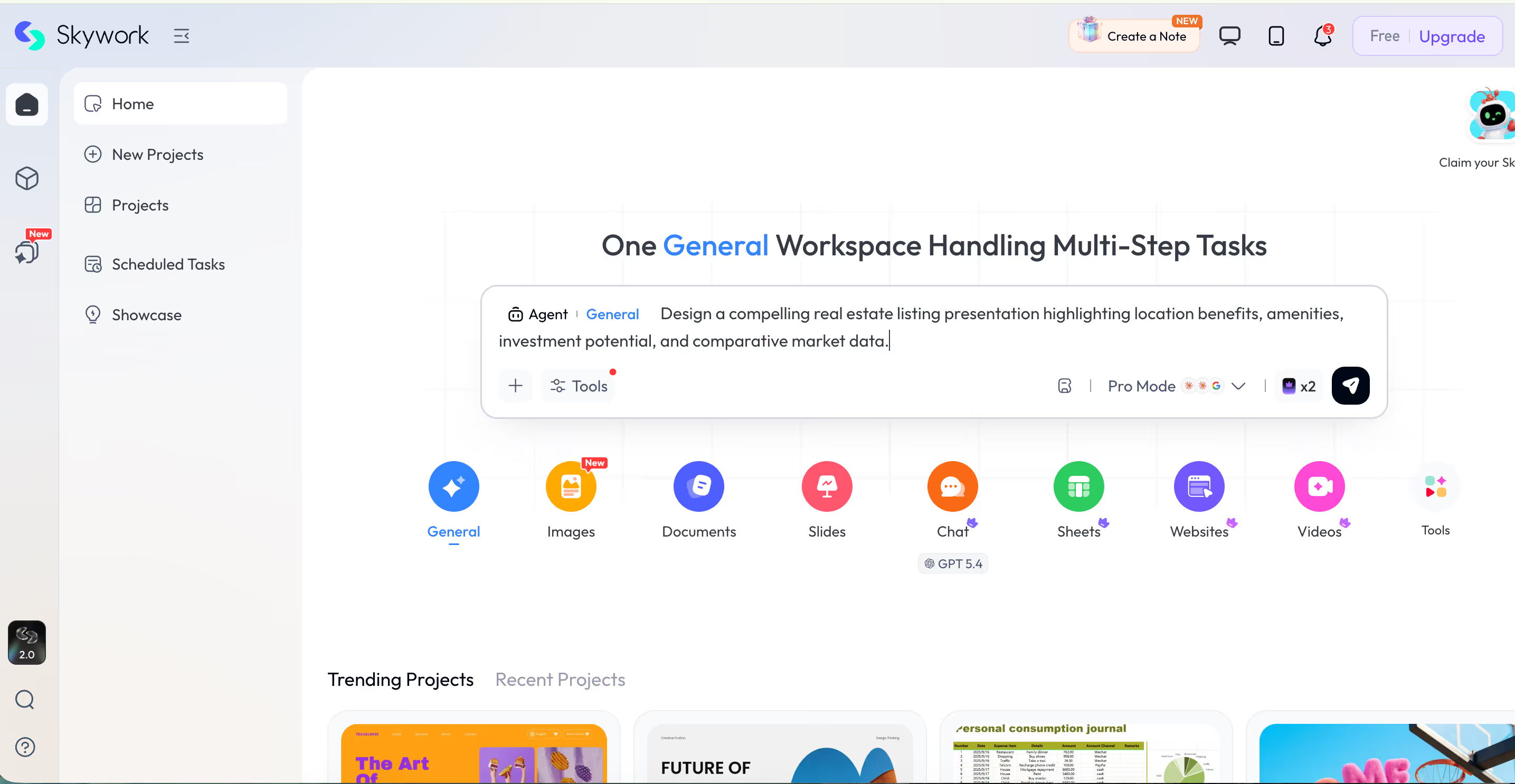
Skywork AI is a general-purpose agentic workspace that handles documents, slides, images, sheets, websites, videos, and more from a single interface. Its tagline: “One General Workspace Handling Multi-Step Tasks." This tells you exactly that it's a broad productivity platform, and not just a presentation tool.
When we tested it with our real estate listing prompt, Skywork routed the request to its Slides Agent inside its Studio panel. It generated a task, began processing, and… kept processing. After five minutes, it was still running. After ten minutes, it finally produced a result.
The output was a flat slide deck titled “Premium Real Estate Opportunity, West Hills, San Diego.” We never mentioned San Diego. Skywork hallucinated a location entirely, generated a watercolor-sketch illustration of a house, and presented it as if the brief had asked for it. The design was basic and the content required significant editing before it would be usable.

Skywork’s presentation feature is exactly what you’d expect from a tool where slides are item four in a menu of eight. It works. But it wasn’t built for this, and the output reflects that.
Beyond the generation speed and quality issues, several factors make Skywork AI a poor fit for teams who need presentations as a core deliverable.
It’s not a presentation platform. Skywork’s slide generation is a feature, not a product. The design controls, template intelligence, narrative structure, and sharing workflows that purpose-built tools have developed over years simply aren’t there.
Slow generation. Ten minutes to produce a basic deck is not a workflow most professionals can absorb. Purpose-built tools generate presentations in under two minutes, often in seconds.
Invented content. Inventing a location that was never part of the brief is a significant quality problem for any professional use case, especially client-facing work.
Design limitations. Output templates are generic and flat. There is no spatial layout intelligence, no automatic visual consistency, and no design system behind the slides.
Every tool in this comparison, except Prezi AI, is fundamentally an agentic AI platform that added presentation generation somewhere in its feature list. That distinction matters enormously when your deliverable is a presentation that someone will actually see.
Agentic AI platforms are optimized to automate complex multi-step tasks across many output types. They are genuinely powerful for research, document synthesis, code generation, and workflow automation. But “powerful across many things” is not the same as “built for presentations.” A tool built for presentations has made deliberate design decisions about slide layout logic, narrative flow, visual consistency, template quality, and sharing workflows. Those decisions compound. The resulting output is categorically different from what an agent produces when it receives “generate slides” as a sub-task.
Our testing confirmed this. Every non-Prezi tool we tested had at least one of the following problems: slow generation, hallucinated content, Shutterstock watermarks on images, text-heavy slides with no visual hierarchy, narrative frameworks that felt mechanical, or outputs that required significant editing before they’d be usable in a professional context.
Prezi AI was the only tool where the output was presentation-ready from the first generation.
Each tool below was tested with the same real estate listing prompt. Here’s what happened.
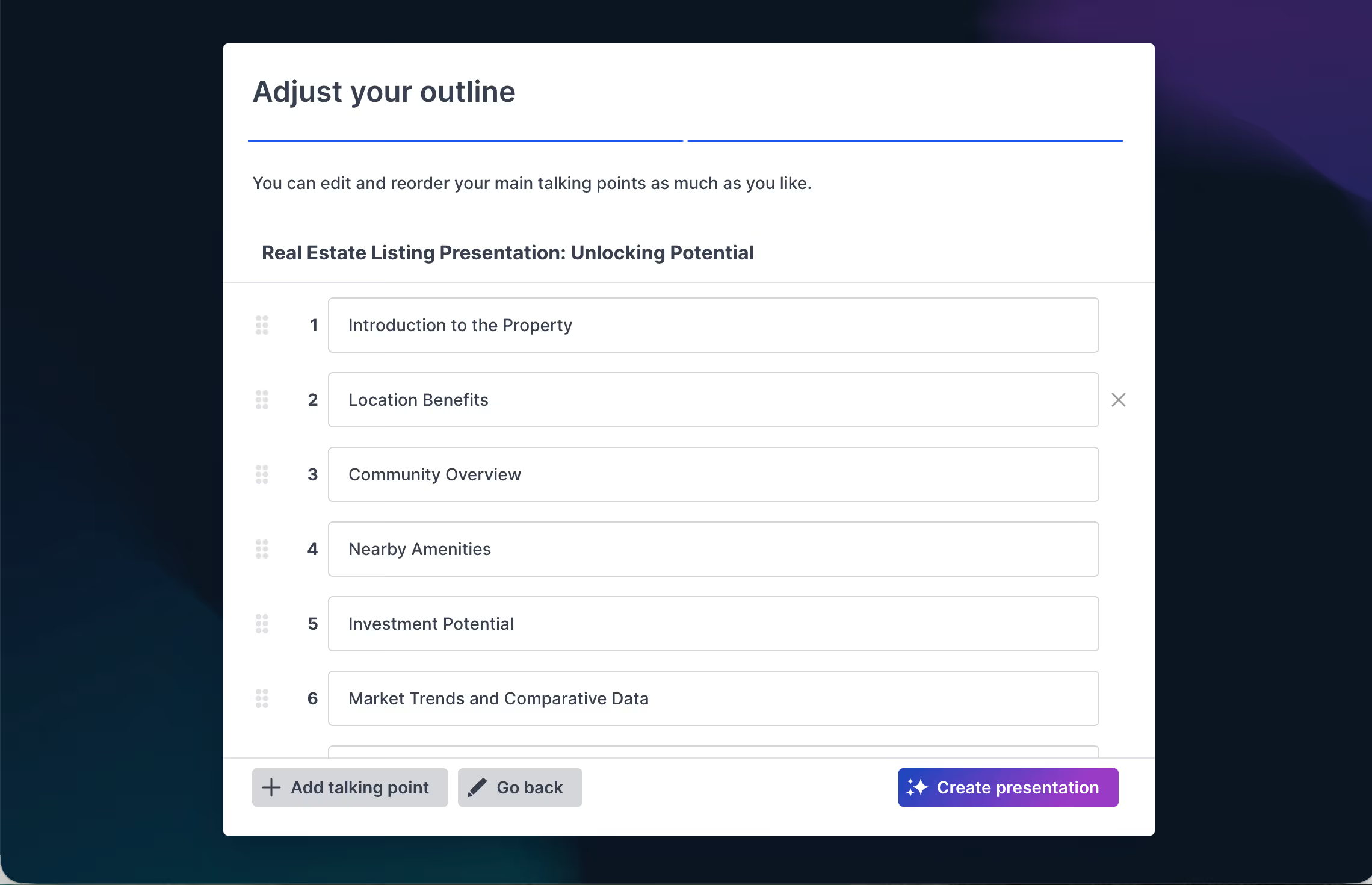
Prezi AI generated a structured presentation outline from our prompt in seconds. The outline editor let us review and reorder the talking points before committing to generation.The full presentation was ready in under two minutes.
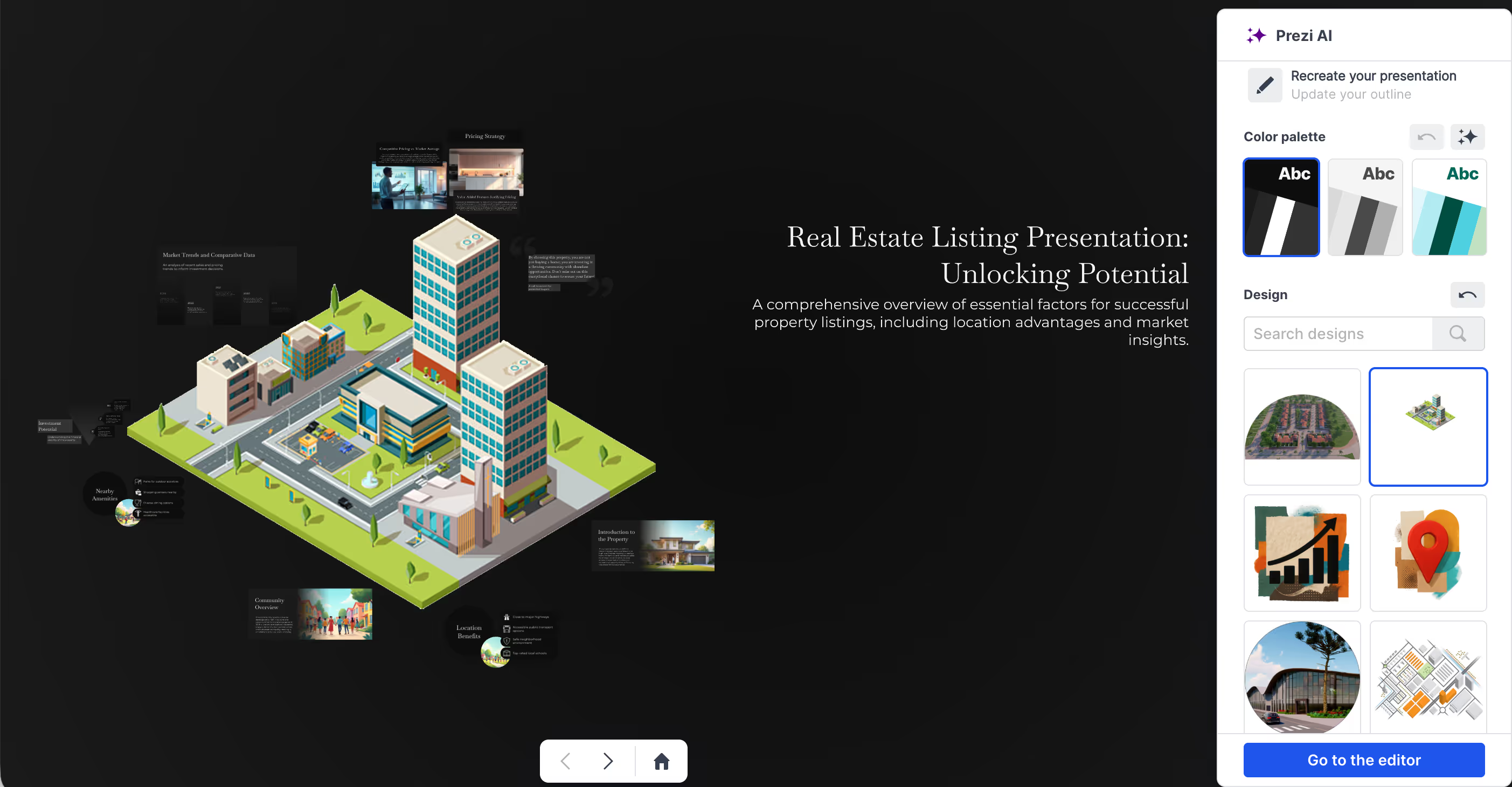
The result was visually striking. Prezi’s spatial canvas placed the real estate listing topics across an isometric city visual, the kind of dynamic, memorable output that makes a presentation stand out. The zooming navigation between topics created a sense of movement and connection. Color palette options and design controls were available immediately, without having to go back into a separate editor.
No hallucinated locations. No Shutterstock watermarks. No ten-minute wait. No text-heavy slides that look like a document printed sideways. Prezi AI did what a purpose-built presentation tool is supposed to do: take a clear brief and produce a presentation that’s ready to show.
The platform also supports video integration, voice-over recording, and viewer analytics to track engagement after sharing. For async presentations, this gives teams insight into what’s actually landing.
Purpose-built for presentations? Yes, the only fully purpose-built tool on this list. Prezi was designed from the ground up for presentations. Every Prezi AI feature is made to serve the act of presenting. It’s not item four in a menu of eight. It’s the whole product.
Best for: Any professional who needs a presentation that actually looks like a presentation
Strengths:
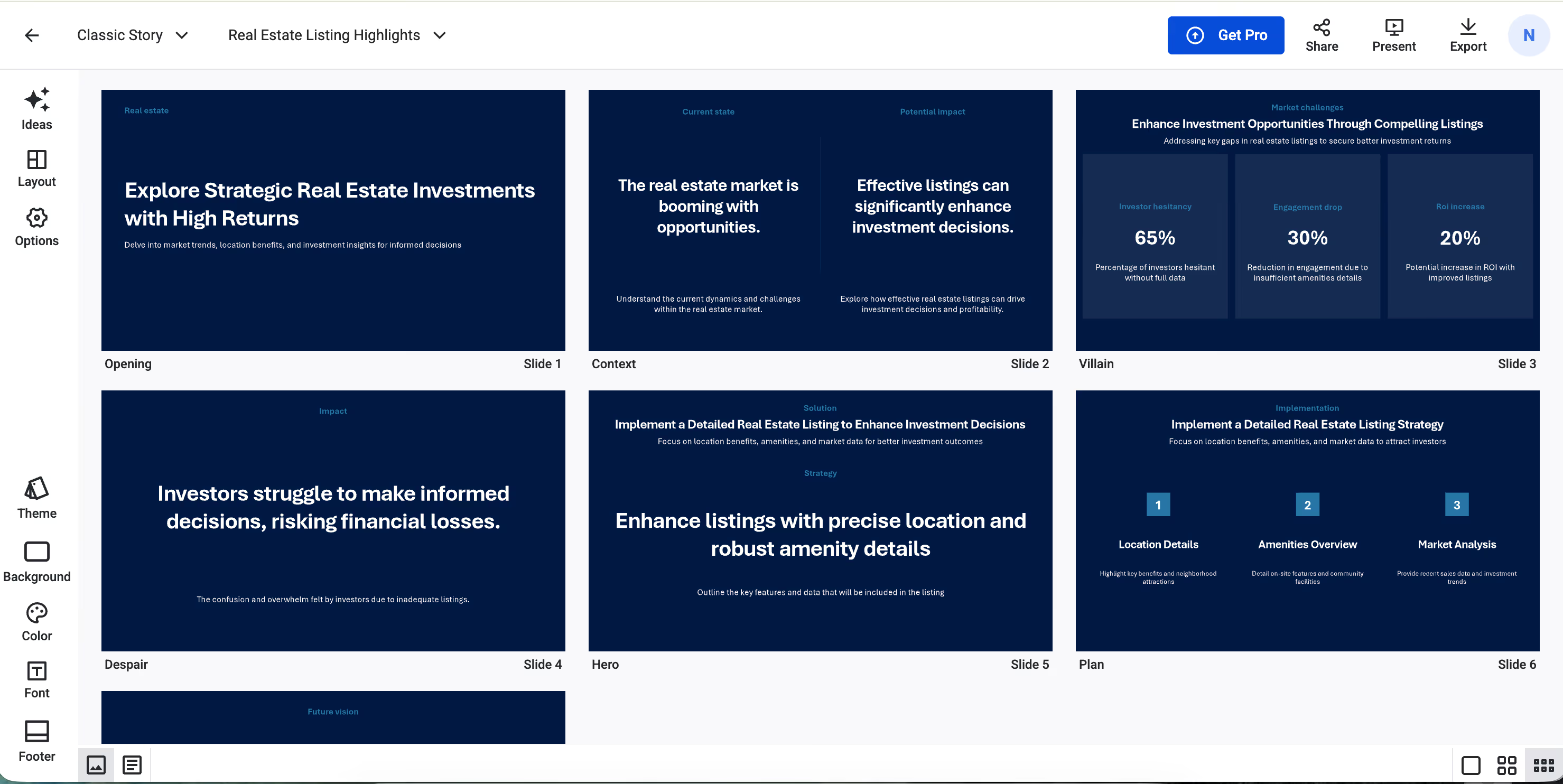
StoryD’s defining feature is its library of storytelling frameworks, structures like Opening, Context, Villain, Despair, Hero, Plan that it applies before generating a deck. The idea is sound: presentations that follow a narrative arc are more persuasive than those that don’t. StoryD bakes that logic into the generation process.
In practice, the output on our real estate prompt was a dark navy template with the narrative framework labels visible on each slide. The content was formulaic with headlines like “Investors struggle to make informed decisions, risking financial losses” and “The real estate market is booming with opportunities.” The structure was there, but the visual execution was flat. Small text, limited imagery, and a template aesthetic that read as generic rather than professional.
StoryD generated a presentation quickly, but the visual quality is where StoryD fell short.
Best for: Business professionals who need to structure a persuasive argument quickly and don’t have strong design requirements.
Strengths:
Limitations:
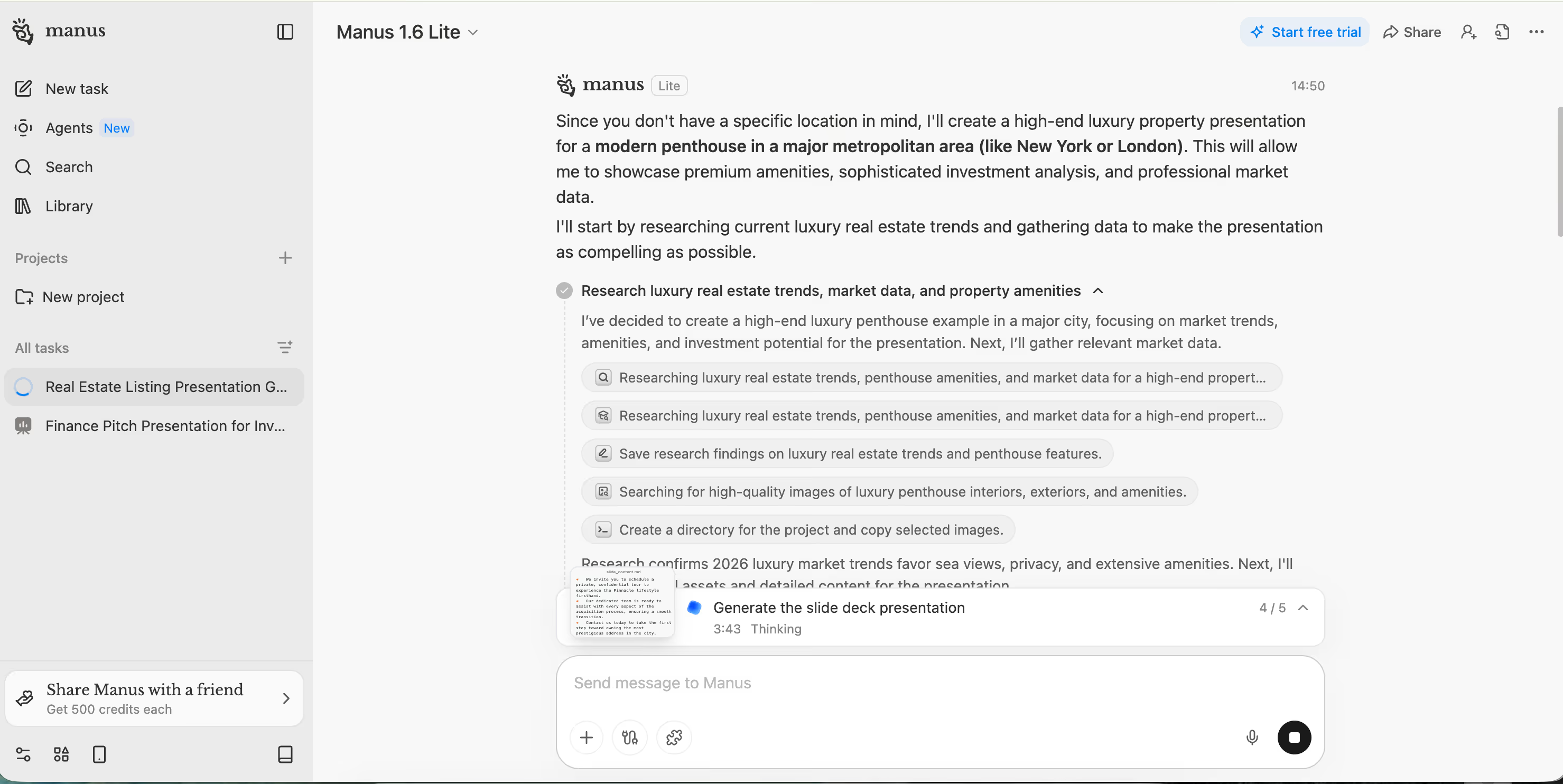
Manus is an autonomous AI agent platform that can do a lot. Presentations are one possible output of its task execution system. Not the output it was built for.
When we tested it with our real estate prompt, Manus handled it better than Skywork in one important way: it asked a follow-up question about which location to use, and when we said no specific place, it confirmed it would create an example. That’s a meaningful improvement in transparency over a tool that just invents San Diego.
But five minutes later, it was still thinking.
When the deck finally appeared, it was titled “The Pinnacle Collection: A New Standard in Urban Luxury.” The cover slide used a Shutterstock image with a visible watermark. Interior slides were text-heavy — financial projections, market data, investment analysis — with the density of a report rather than the clarity of a presentation. The information was substantive. The format was not.
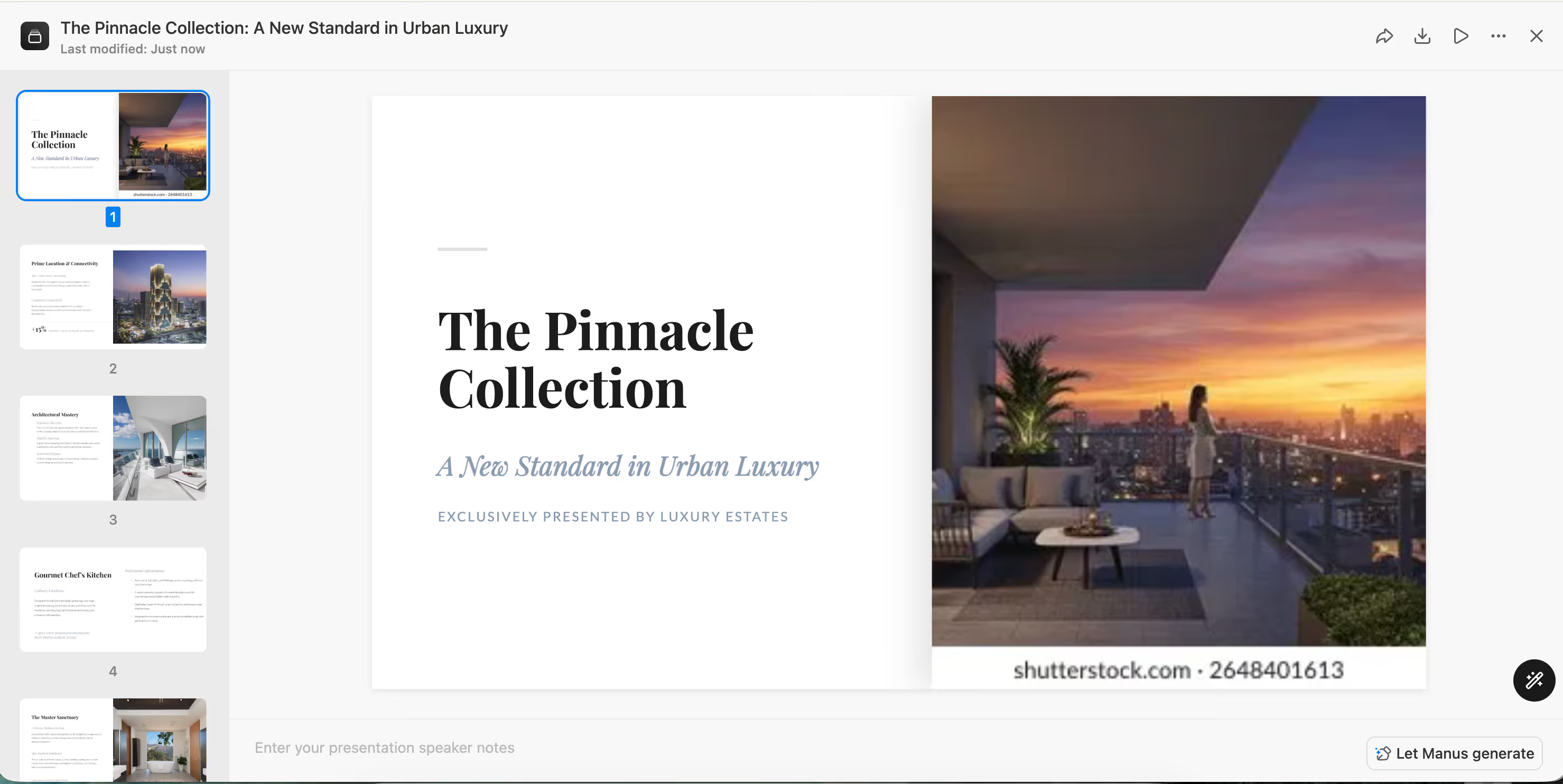
Manus is great as a research and synthesis engine, but if you need that content to look like a professional presentation without additional design work, it is not the right starting point.
Purpose-built for presentations? No. Manus is an autonomous agent platform. Presentations are one downstream output of its task execution system. The research and content structuring is powerful; the slide design is functional at best. Outputs require a design pass before they’re client-ready, and the generation wait time is not suited to a fast-moving workflow.
Best for: Teams that need autonomous research and content synthesis, and can take the output into a dedicated tool for design refinement.
Strengths:
Limitations:
Plus AI is an AI-powered add-on for Google Slides and PowerPoint. Unlike every other tool in this comparison, it doesn’t operate as a standalone platform, it layers AI generation on top of slide tools you already use.
We attempted to test Plus AI with the same prompt. We couldn’t. The free trial requires a credit card upfront, and we weren’t willing to provide payment information just to evaluate a tool. That friction is a significant barrier for any professional evaluating options, and it’s worth flagging plainly: if you can’t try a tool without committing your card, you’re not really evaluating it freely.
Based on its documented capabilities, Plus AI offers solid AI generation within Google Slides and PowerPoint, a Live Snapshots feature that pulls real-time data into slides, and a Slide Remix function that reformats existing decks. It accepts large prompt inputs. For teams already embedded in Google Workspace or Microsoft 365, it’s a legitimate option.
But it’s worth being clear about what Plus AI is: an add-on. It enhances tools that exist independently of it. Remove Google Slides and Plus AI has nothing. That dependency limits its utility for teams who want a purpose-built presentation environment rather than an AI layer on top of a general productivity tool.
Purpose-built for presentations? Partially. Plus AI is presentation-focused, but its existence depends entirely on Google Slides or PowerPoint. Within that context it adds genuine value. Outside of it, it doesn’t exist. And the credit card requirement for any evaluation is a real barrier that purpose-built alternatives don’t impose.
Best for: Teams already working in Google Slides or PowerPoint who want AI assistance without switching platforms.
Strengths:
Limitations:
Google Slides has added AI assistance through Gemini, but it’s worth understanding the significant limitation: Gemini in Google Slides generates one slide at a time, not a full deck from a single prompt. You can ask it to create a slide on a specific topic, and it will. Asking it to build an entire presentation in one go is not currently how the feature works.
For teams already in Google Workspace who want AI help drafting individual slides or refining content, Gemini in Google Slides is a useful incremental tool. For teams that want a complete AI-generated presentation from a single prompt, it isn’t a solution. You’d be manually prompting each slide, which isn’t meaningfully faster than building the deck yourself.
This puts Google Slides in a different category from every other tool in this comparison: it’s not really a presentation AI tool yet. It’s a productivity suite with an AI writing assistant that happens to work inside slides.
Prezi AI vs. Skywork AI. Prezi generated a spatial canvas presentation in under two minutes with no hallucinated content and no design cleanup required. Skywork took over ten minutes, invented a location, and produced a flat deck that needed significant editing. There is no scenario in which Skywork’s presentation output is preferable to Prezi’s for a professional use case.
Prezi AI vs. StoryD. StoryD’s narrative framework approach produces structured decks quickly. But the visual output is generic — dark templates, small text, framework labels on every slide. Prezi’s spatial canvas produces something that looks and feels different from every other presentation in the room. For any presentation where visual impact matters, Prezi wins.
Prezi AI vs. Manus. Manus produced richer, more substantive content than most tools in this comparison — that’s what a good autonomous research agent does. But the slides were text-heavy, watermarked, and formatted like a report. Prezi’s output was visually ready from the first generation. If you need research depth, Manus is a better research tool. If you need a presentation, Prezi is the better presentation tool.
Prezi AI vs. Plus AI. We couldn’t test Plus AI directly, but its dependency on Google Slides or PowerPoint means it’s enhancing a general productivity tool rather than providing a native presentation experience. Prezi’s purpose-built environment and the spatial canvas format it offers aren’t replicable inside Google Slides, regardless of what AI layer is on top.
The pattern across every tool we tested was the same: when AI platforms that weren’t built for presentations try to generate them, the output reflects that. Slow generation, hallucinated content, watermarked images, text-heavy slides, generic templates. The tools are impressive in their native domains. Presentations just aren’t their native domain.
Prezi AI is different. It’s the only tool in this comparison where every design decision, every feature, every template, every piece of infrastructure was built to serve the act of presenting. The test confirmed it: full deck in under two minutes, spatial canvas output that looked nothing like everyone else’s, no cleanup required.
If you’re evaluating Skywork AI for presentations and wondering whether there’s something better, there is. Start with Prezi AI.
No. Skywork AI is a general-purpose agentic workspace that includes slide generation as one of several output types. Its own homepage describes it as “One General Workspace Handling Multi-Step Tasks.” In our testing, its presentation output took over ten minutes to generate and hallucinated a location that was never part of the prompt. It’s a capable productivity tool, just not a presentation tool.
Prezi AI is the only tool in this comparison that was purpose-built for presentations from the ground up. It generated a full deck in a couple of minutes from our test prompt, produced no hallucinated content, required no design cleanup, and delivered output that was ready to present. No other tool in this comparison matched that combination of speed, accuracy, and visual quality.
Yes, but the result typically needs significant design work before it’s presentation-ready. Manus is a strong research and content synthesis engine — it produced substantive financial and market data on our test prompt. But the slides were text-heavy, used watermarked stock images, and had the visual density of a report rather than a presentation. Manus works best as the content engine that feeds into a purpose-built presentation tool for the final output.
Google Slides includes AI assistance through Gemini, but it generates one slide at a time, not a full deck from a single prompt. For teams who want to build a complete presentation from a single input, Google Slides is not a viable alternative to purpose-built AI presentation tools.
It does, and we couldn’t evaluate it on equal terms as a result. We’ve noted this plainly in the review above. Tools that offer genuinely free evaluations — like Prezi — are easier to assess fairly and carry less friction for professional teams doing pre-purchase research.
Yes, because StoryD was actually built for presentations, specifically business storytelling presentations. Its narrative frameworks produce more structurally coherent decks than Skywork’s general-purpose output. But the visual design quality is limited, and for presentations where the look of the deck matters, neither StoryD nor Skywork matches what Prezi AI produces.
Prezi AI
Just enter a few ideas or an outline and we’ll create your presentation for you.