



Resources
AI presentation tools are multiplying fast, and it can be hard to tell them apart at a glance. Prezi AI and Genspark both use artificial intelligence to create presentations from prompts, but the similarities stop there.
Prezi AI is purpose-built for presentations. Everything about the platform, its dynamic presentation format and its AI presentation and image generation features, exists to help you make presentations that move people. Genspark is a broad AI workspace. Slides are one output among many, alongside AI phone calls, AI spreadsheets, AI documents, and more. Genspark spreads its focus among different AI tools, whereas Prezi AI is completely focused on AI presentation generation, delivering the top output.
That difference in focus shapes everything: the quality of the output, the presenter experience, and whether your presentation actually holds an audience's attention when it counts. I tested both tools head-to-head with the same prompt. Here's a clear breakdown.
One thing to note before you sign up for Genspark - it runs on a credit-based model where slide generation, AI edits, and agent tasks consume credits, fast. Pricing isn't visible until after you sign up. Users on Trustpilot and Reddit have consistently flagged unexpectedly rapid credit depletion and difficult billing support. Prezi's paid plans include unlimited AI credits, so there’s no credit math, no surprises.
I tested both tools: Here’s what happened
To put this comparison on equal footing, I ran the same prompt through both Prezi AI and Genspark AI:
“Create a presentation showing how brands use podcast ads, host-read spots, and episode sponsorships to reach targeted audiences.”
Here’s what Prezi AI generated:


Prezi AI instantly generated a complete, structured presentation with a clear narrative arc, visual sections for each topic (podcast ads, host-read spots, episode sponsorships), and branded visuals, all pulled directly from the prompt. The full presentation was ready to present in seconds, no editing required to get started.
Here’s what Genspark AI generated:
Genspark AI didn't generate a presentation. It produced a 12-slide research document, a "Brand Podcast Advertising Guide" sourced from IAB guidelines, Acast, and NPR briefs. The output looked like a data report with ad-type definitions and comparison matrices, not a presentation built for an audience. There was no narrative arc and it took significantly longer to generate, and what came back required substantial additional prompting and credit spend just to resemble a usable deck. There also was a lot of white space that appeared unintentional.
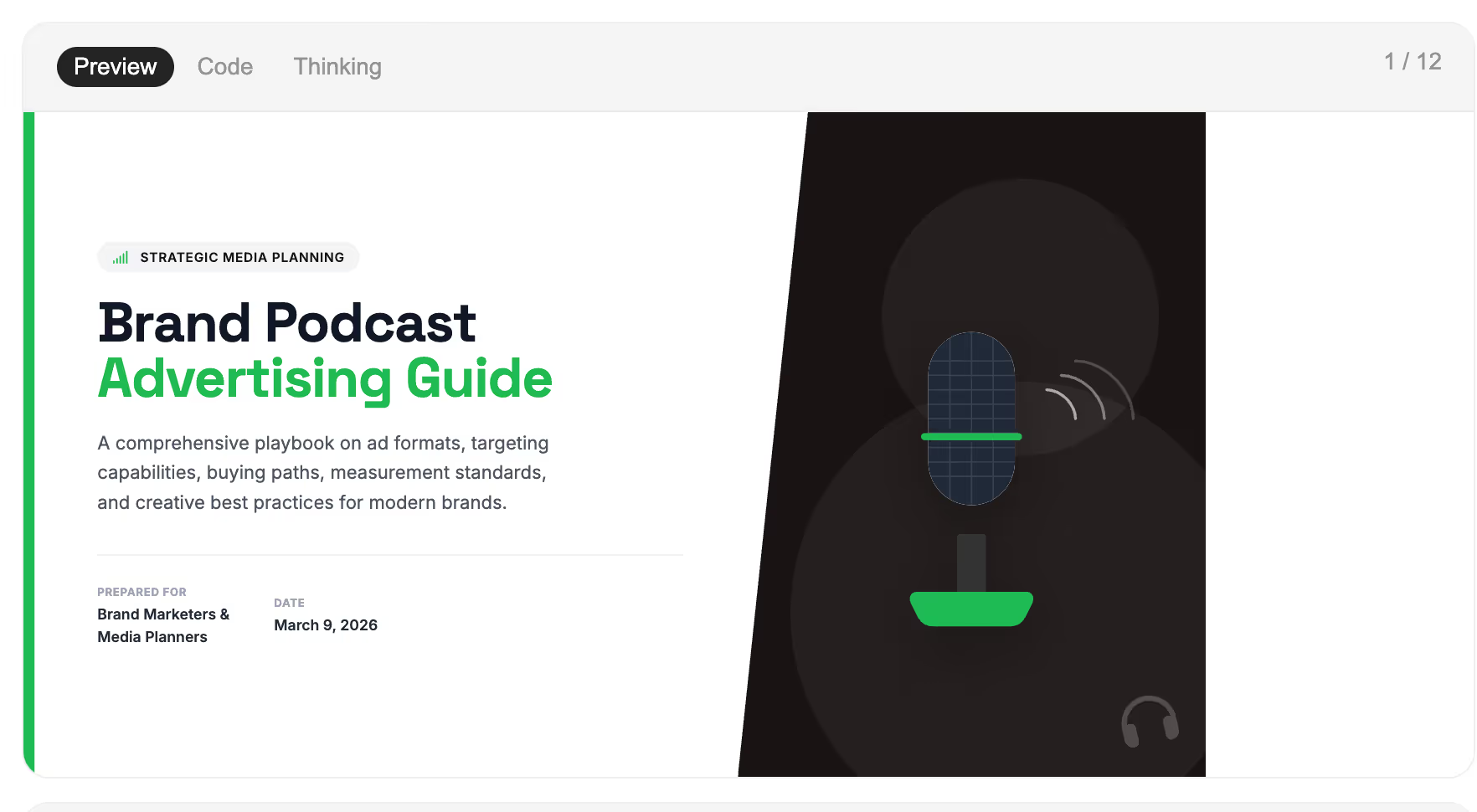
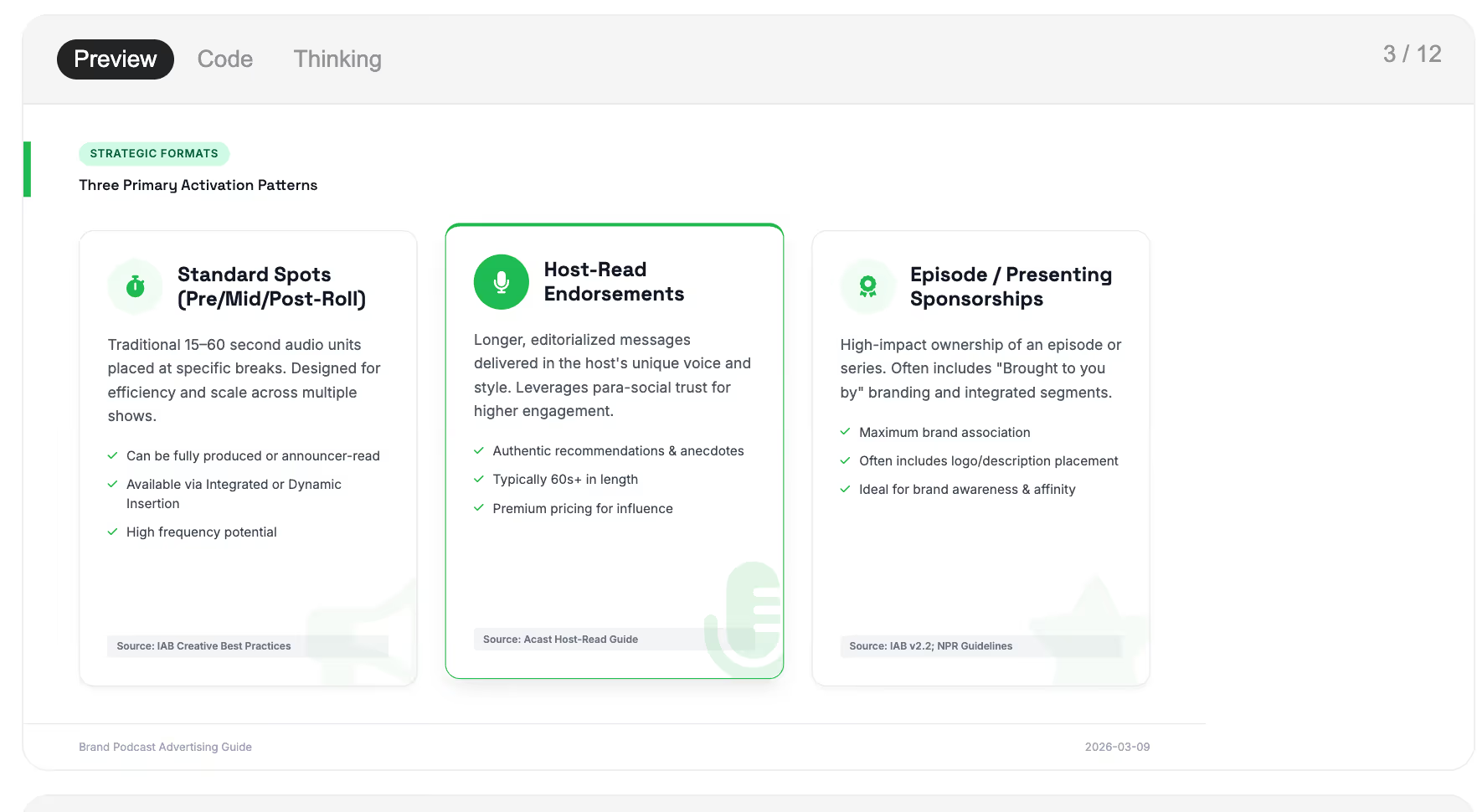
The gap was immediate and obvious. Prezi AI understood the assignment. Genspark AI treated it like a research task.
This test result isn't a fluke; it's the product of a fundamental design difference. Prezi AI was trained specifically on presentations and knows what a presentation needs to do. Genspark AI was trained to automate general tasks, and slide generation is just one of dozens of things its Super Agent attempts. When you ask it to create a presentation, it often defaults to what it does best: generating content in document form, not building a structured, visual presentation.
What are the main differences between Prezi AI and Genspark AI?
The core philosophical difference is straightforward: Prezi AI was built to present. Genspark is built as an AI agent.
Prezi AI's entire platform is organized around one challenge: keeping an audience engaged. Its AI draws on 15 years of presentation design expertise and is trained on the largest public presentation library in the world. Because of that, Prezi AI delivers you custom, unique presentations tailored to your content.
When it structures your content, it applies that knowledge, not just to make slides look tidy, but to create a flow that guides attention from idea to idea. The result is a presentation built for communication, not just documentation.
Genspark's Super Agent handles research, data analysis, document drafting, website creation, real phone calls, and slide generation. That breadth means presentations get no special treatment, they are processed the same as any other automated task. But presentations get the same treatment as any other output type. There's no presentation-specific AI training, no dynamic canvas, no presenter video integration, no audience analytics. Slides are a feature; they're not the product.
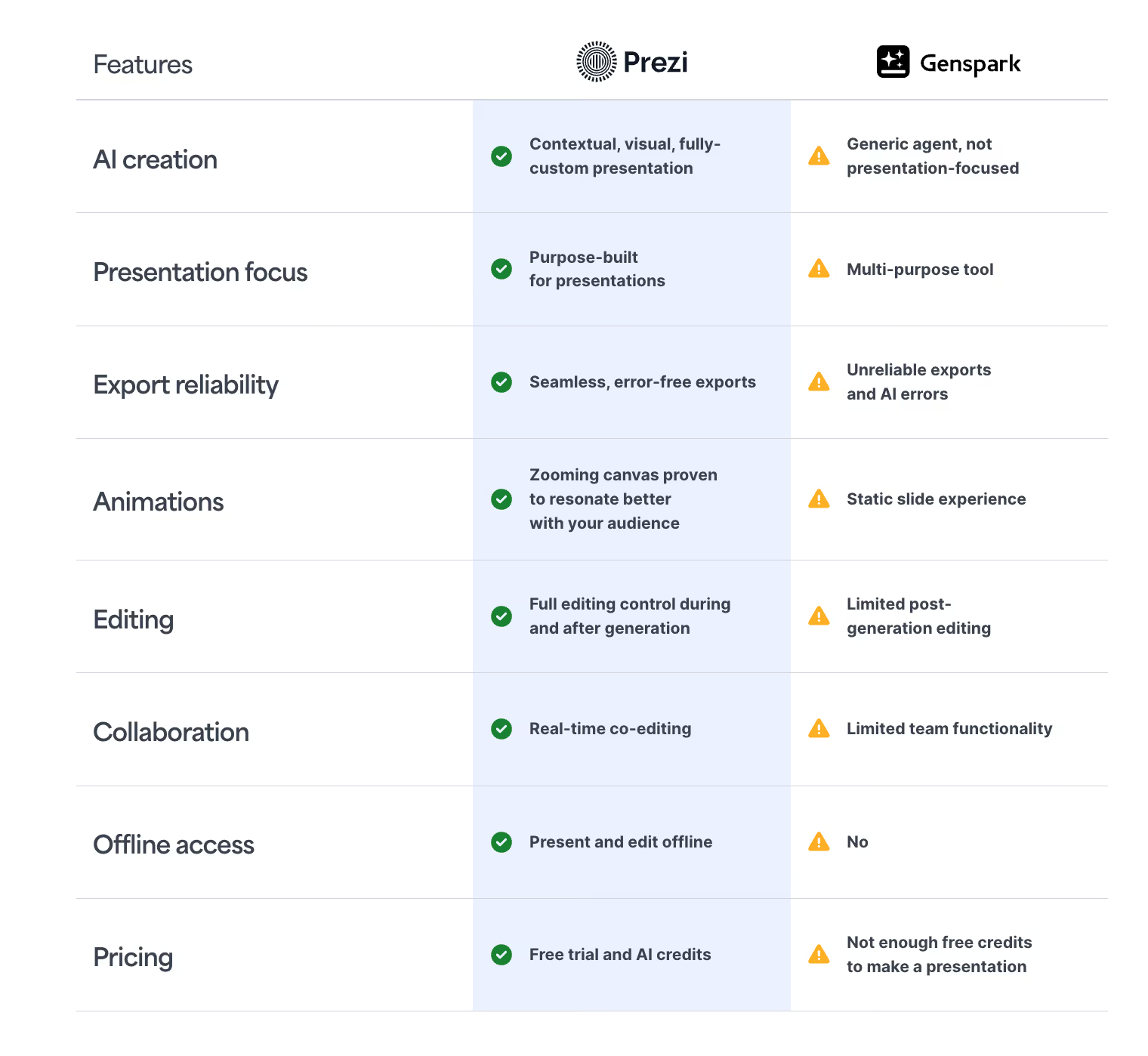
A look at the features: Prezi AI vs. Genspark
AI-powered creation
Both tools generate a full presentation from a single text prompt, and both accept uploaded files. Prezi AI transforms PDFs, Word documents, and PowerPoints into complete, fully designed, dynamic presentations, not just reformatted into a new template. The AI draws on 15+ years of Prezi design expertise to apply structure, hierarchy, and visual flow that reflect what actually works in a presentation context. Which is why you don’t even need a template to get started. Prezi will create personalized presentations made for you, pulling from your prompt or uploaded file.
Genspark's AI slide generation pulls from its general research capabilities. You can choose a tone (corporate, creative, minimal), import a PPTX template, and export to PowerPoint, PDF, or a shareable link. The results are inconsistent and often fall short of a true presentation. But it's generated by a system trained for general task automation, not for presentation-specific communication. This lack of focus on presentations weakens it as a tool for slide generation, as the prompt test above makes very clear.
Visual experience and canvas
This is the sharpest difference between the two tools. Prezi offers a dynamic, zoomable canvas. Your presentation unfolds across a unified visual space, zooming in on detail, pulling back to show context, moving fluidly between connected ideas. This creates momentum. It guides your audience rather than asking them to follow along slide by slide. In a boardroom or a remote meeting where distractions are one click away, that difference shows.
Genspark produces a standard slide deck; the format is the same your audience has seen from every other tool, and format shapes engagement.
Editing and customization
Prezi AI builds editing directly into the creation experience. Once your presentation is generated, you can refine content inline with AI, where you can shorten, rephrase, adjust tone, or convert text-heavy sections into visual layouts like flowcharts and animated paths. Upload your logo and Prezi AI automatically extracts your brand colors and applies them. The platform manages layout, spacing, and visual hierarchy so you can focus on your message rather than the mechanics of the slides.
Genspark offers an "Advanced Edit" mode for drag-and-drop adjustments. Its AI Edit dropdown includes "Fix Layout" and "Polish Content" options. But here's the catch: if you want to use AI to make edits, it consumes credits — making it costly and inefficient to iterate on presentations with this tool. Every tweak to your deck chips away at your monthly allowance.
Exporting options in Prezi vs. Genspark
Prezi allows you to export in multiple formats, including PowerPoint and PDF files or through a web link. You can also export to a video format using Prezi Video, which lets you appear on-screen alongside your content during a live meeting or recording, the way a broadcaster does. Your face and your slides share the screen simultaneously, keeping you personally connected to your audience. This is especially powerful for remote or hybrid environments where a screenshare alone loses the human element.
This is where Genspark AI falls short. Genspark also exports to PowerPoint, PDF, or a public web link, but there's no equivalent video integration. Once the deck is exported, how you present it is entirely on you.
Collaboration and teams
Prezi for Teams includes centralized brand controls, real-time co-editing, admin management, secure SSO, and engagement analytics, designed for organizations where multiple people create presentations regularly. Prezi's analytics go beyond basic view counts: you can see which sections of your presentation held attention and where engagement dropped, giving you actionable data to refine your message. Genspark offers shared presentation links but no comparable team management layer or presentation-specific analytics.
Why Genspark AI is not built for making slides
Genspark can produce a deck, but the results are inconsistent. The slides are professional and organized, but they lack impact and memorability. As my prompt test showed, Genspark doesn't always even produce a presentation at all. It produced a list of ideas. A research dump. Not a deck.
If quality means a presentation that earns and keeps your audience's attention, one where the structure, flow, and motion all work together to make your message land, Prezi AI operates in a different category. The dynamic canvas doesn't just look different from a conventional slide deck; it performs differently. Ideas connect in ways that static slides can't communicate. Motion guides attention rather than relying on the audience to follow along.
Genspark can make a slide deck, but Prezi AI generates powerful presentations. The first is a document in slide clothing. The second is a communication experience, tailored to your audience.
The numbers reflect this. Four out of five Prezi users say it's more effective at capturing audience attention compared to traditional slides.
Instead of Genspark AI, you should use Prezi AI…
If you need your presentations to capture and hold attention
Prezi AI is the choice. The dynamic canvas and AI trained specifically on presentation design are built for one purpose: making sure your message lands. Whether you're pitching to a client, presenting strategy to leadership, or making a case that needs to be remembered after the meeting ends, Prezi gives your content the momentum that static slides can't provide.
If you're starting from an existing document
Both tools accept file uploads, but Prezi AI goes further. Upload a PDF, Word document, or PowerPoint, and Prezi AI transforms it into a dynamic, fully designed presentation that moves, not just a reformatted version of what you had. If you're converting a document into something ready to present, Prezi's output will feel like a genuine upgrade.
If your team creates presentations regularly
Prezi for Teams includes centralized brand controls, real-time co-editing, admin management, SSO, and presentation analytics, everything an organization needs when multiple people are creating and presenting on a regular basis. Genspark doesn't have an equivalent team management layer for its slide tool.
Prezi AI is the better fit if you…
- Need to capture and hold audience attention
- Present regularly to clients, leadership, or students
- Want to transform existing documents into something ready to present
- Present remotely and want Prezi Video to stay on screen with your content
- Need team-level brand controls and engagement analytics
- Want transparent, predictable pricing with no credit surprises
Genspark AI may suit you if:
- You’re not looking for an AI presentation maker and want to make other content
- You’re creating content where format matters less than speed
- A basic slide format is sufficient
A breakdown of plans and pricing
Pricing transparency is one of the sharpest practical differences between these two tools. Prezi's plans are clearly structured, with unlimited AI credits on paid tiers and no credit-based surprises. Genspark uses a credit model where heavier tasks, like complex slide generation, video creation, and agent workflows, consume credits quickly. Genspark AI users on Trustpilot and Reddit have consistently flagged unexpectedly rapid credit depletion as a significant frustration with the platform. And critically: Genspark doesn't show you pricing until after you've signed up, which is a red flag for anyone trying to budget a team tool.
Prezi AI pricing
- Free (Basic) - $0/mo
- Plus - $19/mo
- Premium -$29/mo
- Teams - Contact sales
- EDU plans From $4/mo
Unlimited AI credits on Plus and above. Paid plans include PowerPoint import, offline access, privacy controls, analytics, and advanced collaboration. Student and educator discounts available.
GenSpark AI pricing
- Free -Limited daily credits
- Plus~$25/mo
- Pro~$249/mo
- Extra credits - $10 / 5,000 credits
Credit-based system. AI chat is unlimited; complex tasks consume credits rapidly. Plus plan supports approximately 10–15 serious tasks per month. Geoblocking applies in some regions.
What are the limitations of Genspark AI?
Genspark's credit model is the most consistently cited frustration in user reviews. Credits deplete faster than expected on heavier tasks, pricing information isn't visible until after signup, and billing support has been difficult to access when issues arise. As of December 2025, Genspark holds a Trustpilot rating of approximately 2 out of 5 stars, with complaints concentrated on pricing and support. Geoblocking also makes paid plans unavailable in several countries.
For presentations specifically, there's no dynamic canvas, no presenter video integration, no presentation analytics, and no AI trained specifically on what makes presentations work. If your slides need to perform in a high-stakes context, these aren't minor gaps; they're the whole point.
How do you choose between Prezi AI and Genspark?
The decision comes down to what your presentation actually needs to do. If you want a tool built specifically around the challenge of communication, one with 15 years of presentation design intelligence, a dynamic canvas designed for attention, and a presenter experience built for remote and hybrid environments, Prezi AI is the right choice. It's a platform that was designed to help you move an audience, not just inform one.
If you want a broad AI workspace where slides are just one of many automated outputs, meaning the product is not purpose-built for presentations — you could use Genspark. But be aware: its slide tool is a convenience feature within a larger platform, the credit-based pricing model has generated significant frustration among users, and as my own test showed, it doesn't always produce a presentation at all.
For anyone whose work regularly involves presenting, to clients, to leadership, to students, or to customers, the difference in quality, engagement, and presenter experience makes Prezi AI the professional choice. Try Prezi AI today and see what a presentation built specifically for fast creation and audience engagement looks like.
Frequently Asked Questions
Is Genspark actually a presentation tool?
Genspark includes a slide generation feature as part of a broader AI workspace. It can produce clean, structured decks from prompts or uploaded files, but it's not purpose-built for presentations. Slides are one of many outputs alongside research reports, spreadsheets, podcasts, and more. In testing, the same prompt that produced a complete, ready-to-present deck in Prezi AI returned a list of podcast content ideas in Genspark, no outline, no structure, no slides. If presentations are a core part of your workflow, that distinction matters.
Can both tools generate a full presentation from a prompt?
Both tools can generate presentations from text prompts and accept file uploads (PDFs, Word documents, PowerPoints). However, Prezi AI stands out as the stronger tool for robust presentations from a prompt. Prezi AI produces a dynamic, motion-driven presentation built on 15 years of presentation-specific design expertise. Genspark produces a basic slide deck from a general-purpose AI workspace (if it produces a deck at all).
Which tool is better for remote and hybrid presenting?
Prezi AI has a clear advantage here. Prezi Video lets you appear on-screen alongside your content during live meetings, keeping you personally connected to your audience rather than hidden behind a screenshare. Genspark exports slides to PowerPoint, PDF, or a web link, but has no equivalent presenter mode for live delivery.
How do Prezi credits work vs. Genspark credits?
Prezi's paid plans (Plus and above) include unlimited AI credits, where you can generate presentations, create AI images, and make AI-powered edits without tracking or managing a credit balance. You can also use Prezi’s free plan with 500 credits which is enough for AI presentation generation. Genspark uses a credit-based model where every significant action, like slide generation, AI edits, agent tasks, consumes credits. The free tier provides limited daily credits that aren't enough to fully generate a presentation. The Plus plan (~$25/mo) supports only around 10–15 serious tasks per month before credits run dry. Additional credits are $10 per 5,000, and they go fast. Users consistently report the model burns through their allowance faster than expected.
Can I use my company's branding with both tools?
Yes, both tools support branding — but differently. Prezi AI lets you upload your logo and automatically extracts your brand colors, applying them at the generation stage with no manual setup required. Genspark does not have that automatic brand extraction functionality; you'd need to import a PPTX template to maintain brand consistency. For deeper team brand management, locked templates, admin controls, and centralized asset management,Prezi for Teams is the more complete solution.
Which tool is faster to get started with?
Prezi AI generates a complete, fully designed presentation from a prompt in seconds with no design experience required. Getting a usable presentation out of Genspark often requires multiple follow-up prompts and additional credit spend, making it significantly slower for presentation creation specifically.