



Resources
Google Slides is free, familiar, and fine. But “fine” doesn’t win pitches, close deals, or make training stick. If you’ve ever wondered whether there’s a better way to present, there is, and we tested five of the top alternatives to find out.
We gave each tool the same prompt: “Create a presentation for onboarding new sales reps, including product overview, objection-handling scripts, competitor comparisons, and outreach best practices.” Here’s what we found
Key Takeaways
- Prezi AI was the fastest to generate a complete, structured presentation, and the only one that doesn't rely on templates.
- Canva asked clarifying questions before generating, took longer, and is better suited for design work than presentation creation.
- Gamma produced a text-heavy result that was hard to navigate and didn’t feel purpose-built for presenting.
- Beautiful.ai let us choose an AI style upfront but felt cumbersome to edit, with some AI images that felt out of place.
- Microsoft Copilot for PowerPoint requires a paid Microsoft 365 subscription, limiting how thoroughly it can be tested.
1. Prezi AI
What it does: Prezi AI turns your ideas into fully custom presentations in seconds, with no templates, no generic layouts. Just type a topic or upload a file, and Prezi designs everything: structure, visuals, and flow, all tailored to your specific content.
Who it’s for: Sales teams, marketers, trainers, consultants, anyone who needs to present with impact and can’t afford to waste time on design.
When we entered our sales onboarding prompt, Prezi AI generated a complete, well-structured presentation faster than any other tool we tested. The outline was strong and immediately usable, covering product overview, objection-handling scripts, competitor comparisons, and outreach best practices, all organized into a coherent narrative.

What set it apart wasn’t just speed. It was the quality of what came out. Prezi didn’t ask us to pick a template or choose a color scheme. It read what we were presenting and designed around it, custom layouts, relevant visuals, and a dynamic zoomable canvas that makes ideas feel connected rather than compartmentalized. The result felt like something a professional designer had built, not something we’d pulled from a library.
Prezi’s dynamic presentation experience is also fundamentally different from other AI presentation tools. During a live presentation, you can move freely between topics, zoom into detail when needed, and pull back to show the bigger picture, making it far easier to adapt to your audience in the room.
Key features:
- Instant AI presentation generation that takes a full deck from a single prompt
- No templates: content designed specifically around what you’re presenting
- One click to transform existing presentations from a file or prompt
- Real-time collaboration where a full team can build and edit together live
- Brand kit: colors, fonts, and logos locked in automatically
- Video presenting: appear alongside your content on screen
- Analytics: viewer engagement data after every presentation
Pros:
- Fastest generation of any tool we tested; it created a complete deck in seconds
- No templates so every presentation is tailored to your content
- 4 out of 5 users say Prezi captures attention better than competitors
Cons:
- Dynamic presentation format may be different (but more engaging) than other slide tools
Pricing: Free plan available · Plus $7/mo · Pro $19/mo · Teams plans available
2. Beautiful.ai
What it does: Beautiful.ai uses AI to automatically format and arrange slides as you add content, keeping decks visually consistent without manual design work.
Who it’s for: Teams who want cleaner, more consistent slides within a traditional slide format.
When we entered our sales onboarding prompt, Beautiful.ai let us choose an AI style upfront before generating, which is helpful to have control over the visual direction.
The editing experience, however, felt cumbersome. Navigating the AI-assisted design tools required more effort than expected, and some of the AI-generated images felt out of place and didn’t clearly connect to the content on the slide. The tool is a meaningful step up from Google Slides for design consistency, but the workflow friction adds time back that the AI speed saves.
Beautiful.ai generated a decent enough presentation, but requires a lot of work for it to become polished and ready-to-present.

Key features:
- Smart slide templates that auto-format as you add content
- AI style selection before generation
- Brand kit for colors, fonts, and logos
- Slide library with pre-built layouts
- Real-time team collaboration
Pros:
- Produces consistently clean-looking slides
- Good for teams who need brand alignment across a large deck
- Faster than manual formatting in PowerPoint or Google Slides
Cons:
- Editing felt cumbersome — more friction than expected
- AI-generated images were sometimes irrelevant or out of place
- More expensive than Prezi
- Customization options are more limited than they appear upfront
Pricing: Starter $12/mo · Pro $40/mo · Team plans available
3. Microsoft Copilot (PowerPoint)
What it does: Embedded in Microsoft 365, Copilot generates full decks from Word docs or outlines, edits existing slides, and recommends visuals, all inside PowerPoint.
Who it’s for: Enterprise users and professionals creating formal business decks or reports within the Microsoft ecosystem.
We were unable to provide a thorough review of Microsoft Copilot because testing it fully requires a Microsoft 365 Copilot subscription, which is a barrier that limits accessibility for many users right out of the gate.
Based on what we could evaluate: Copilot integrates directly into the Microsoft 365 ecosystem and is designed to assist across PowerPoint, Word, and Excel. Within PowerPoint, it can generate structured decks from text prompts, suggest layouts, summarize content, and refine design elements. The experience feels smooth and well-integrated for those already in the Microsoft environment — our prompt generated a structured deck with relevant section headers, suggested layouts, and concise text for each slide.
That said, the depth and specificity of the content depended heavily on the complexity of the prompt and the data available within connected Microsoft applications. Design output felt traditional and template-driven. And like every other tool on this list except Prezi, it’s still a linear slide format — which means the fundamental limitations of static presenting remain.
Key features:
- “Draft with Copilot” presentation generation from prompts or Word docs
- AI rewriting and summarization of existing slides
- Excel data visualization integration
- Enterprise-grade privacy and compliance
- Design suggestions and visual recommendations
Pros:
- Deep integration with the Office ecosystem
- Consistent enterprise security and compliance
- Smooth experience for teams already in Microsoft 365
Cons:
- Requires Microsoft 365 Copilot subscription (~$30/user/month)
- Design output feels traditional and template-driven
- Content quality depends heavily on prompt complexity and connected data
- No dynamic movement or engagement advantage over static slides
Pricing: Included with Microsoft 365 Copilot (~$30/user/month)
4. Canva
What it does: Canva excels at quick design work, from social posts to infographics. While not a full AI deck builder, it’s great for visual polish and branding.
Who it’s for: Marketers, educators, and freelancers who prioritize design quality and brand aesthetics over presentation depth.
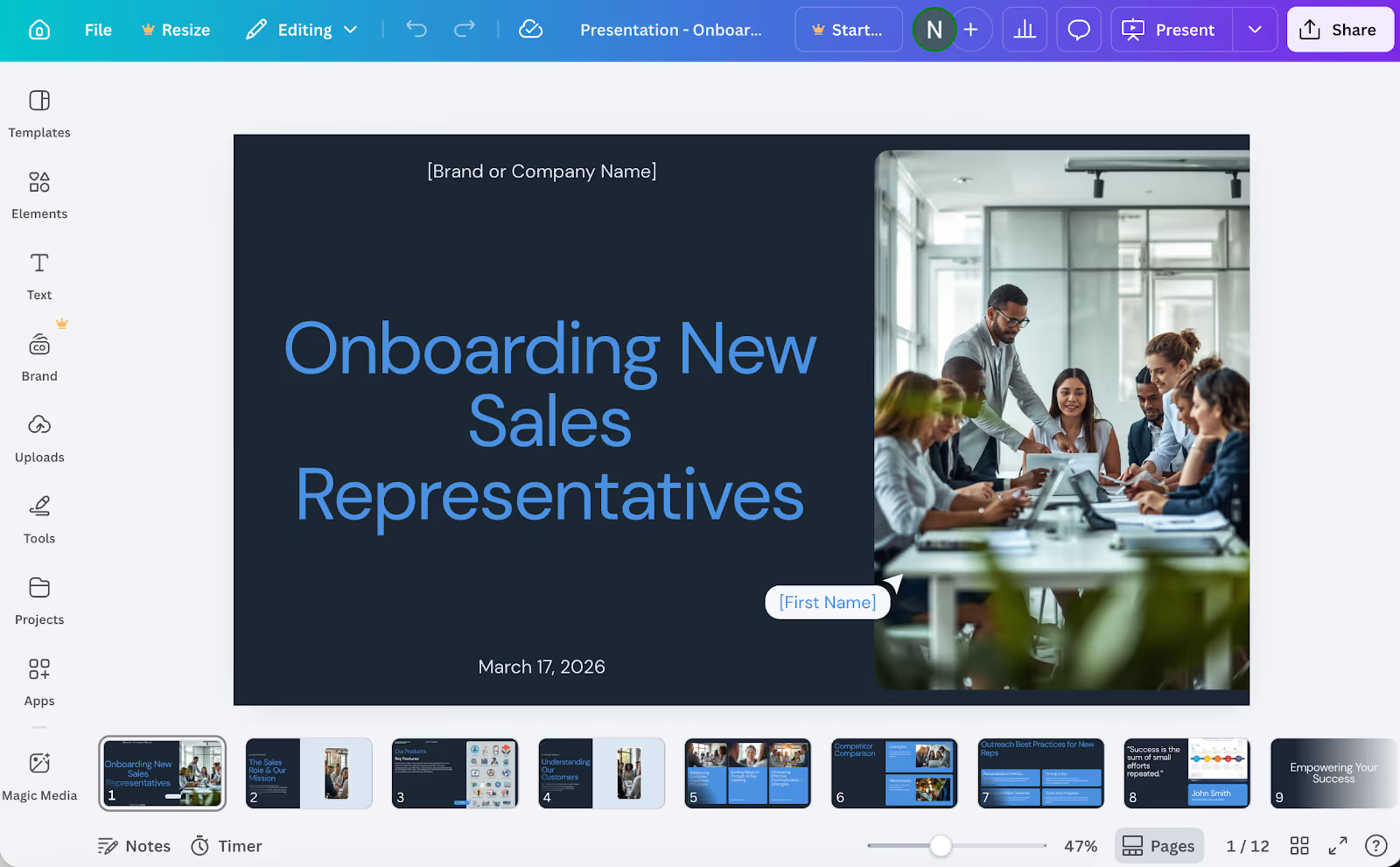
Before generating anything, Canva asked us a series of clarifying questions (audience, slide count, preferred style) to help tailor the output. A thoughtful approach, but one that added time. It then offered two visual style options to choose between before generating the deck, which was a nice touch.
The output itself was polished and visually appealing, Canva’s design strength is real, and the images it selected were high quality. But the content was fairly broad and generic, better suited as a starting point than a ready-to-use presentation. Every other tool we tested generated a full presentation faster.
The deeper issue is that Canva is not purpose-built for presentation creation. It’s a design tool that also makes slides. It continues to excel in graphic design, social media assets, and branded marketing materials. For presentations that need to actually move an audience rather than just look good, it falls short.
Key features:
- Drag-and-drop templates with a massive asset library
- Magic Write (AI text) and Magic Design for quick generation
- Brand kits and custom fonts
- Export as video, PDF, or slideshow
- Clarifying question flow before generation
Pros:
- Good for social images and creating visual elements
- Vast library of high-quality images and graphics
- Good option if design polish is the primary goal
Cons:
- Slower to generate than Prezi AI — asked multiple questions before starting
- Content was broad and generic, not tailored to the presentation topic
- Not purpose-built for presentations — design tool first, deck builder second
- Weak data visualization tools
Pricing: Free plan · Pro $15/mo · Teams $10/user/mo
5. Gamma
What it does: Gamma is an AI-native presentation builder that generates full decks from a prompt quickly.
Who it’s for: Individuals who need to generate a shareable deck quickly for internal use or simple reporting.
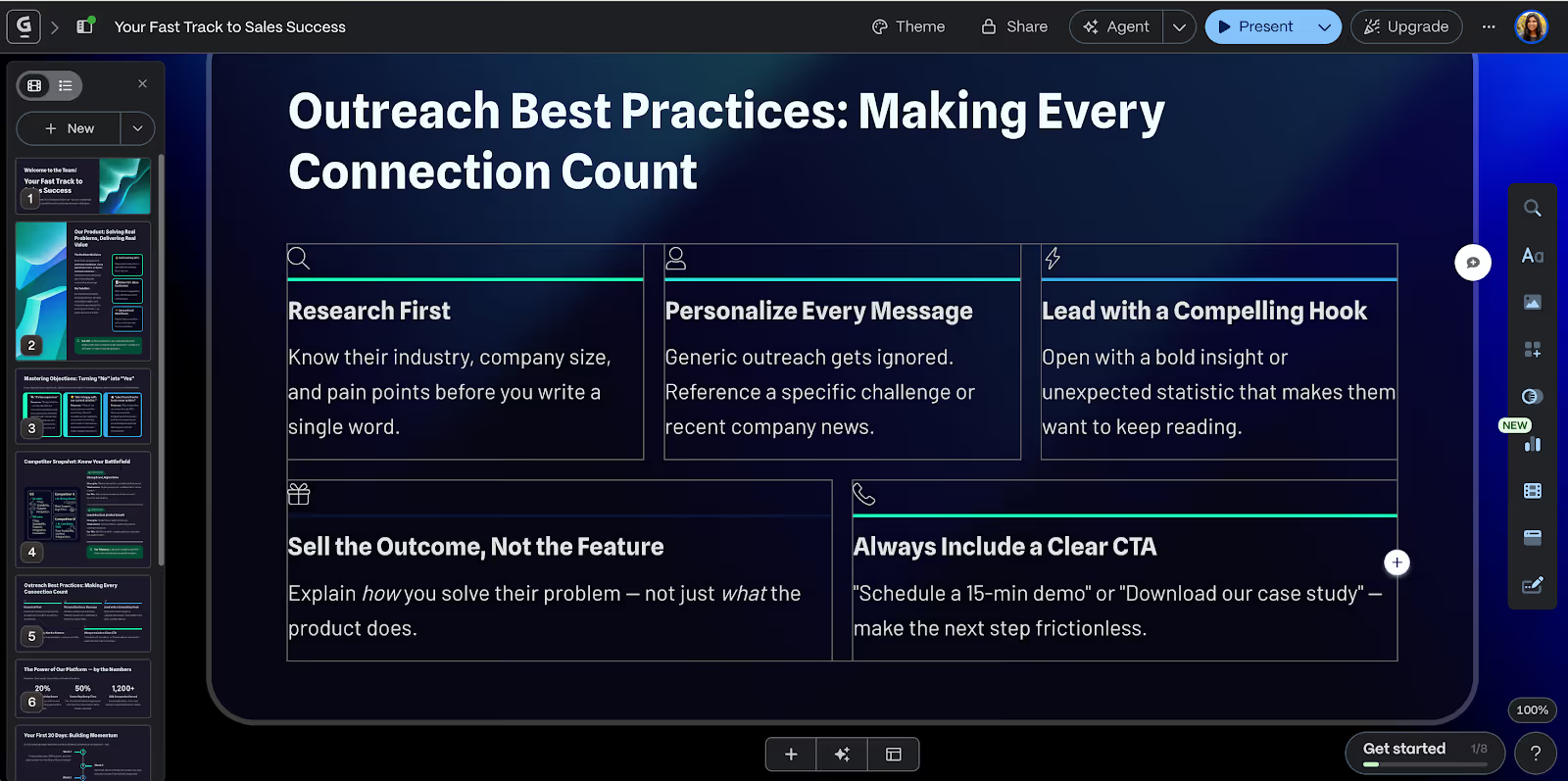
Gamma generated a presentation from our prompt, but the result felt more like a long-form document than a presentation. The output was text-heavy — dense slides that would be difficult to follow in a live setting — and the navigation between sections felt hard to parse at a glance.
Gamma works for rapid internal decks where the audience is reading, not watching. But for a sales onboarding presentation that needs to land with a new hire, the format works against you. A rep sitting through a Gamma deck isn’t being presented to — they’re reading a document that happens to scroll vertically.
Speed is Gamma’s strongest selling point, and it delivers on that. But speed in the wrong direction still gets you the wrong result. Every other tool we tested took longer than Prezi AI to generate, and Gamma’s output required the most post-generation editing to make it presentation-ready.
Key features:
- Fast AI generation from a single prompt
- Clean, modern visual aesthetic
- Shareable as a link without export
- Basic editing and content refinement tools
- Embeds and media support
Pros:
- Modern design aesthetic out of the box
- Easy link-based sharing
Cons:
- Output was text-heavy and hard to navigate in a live setting
- Not purpose-built for presenting — feels more like a scrollable doc
- Limited customization depth
- Required the most post-generation editing of any tool we tested
Pricing: Free plan · Plus $8/mo · Pro $15/mo
The verdict
Every tool we tested can generate a presentation. But there’s a significant gap between generating slides and creating a presentation that actually works.
Prezi AI was the fastest, produced the strongest outline, and was the only tool that designed content specifically around what we were presenting rather than dropping it into a pre-existing template. The zooming canvas makes it fundamentally different to experience as an audience member — not just visually, but cognitively. Ideas connect. The structure is clear. You remember it.
The others all have their place. Beautiful.ai if you need cleaner slides in a traditional format. Canva if design aesthetics are your primary concern. Microsoft Copilot if you’re locked into the Microsoft 365 ecosystem. Gamma if you need something shareable in minutes and the stakes are low.
But if the goal is a presentation that actually moves your audience — one that’s faster to build, smarter in design, and proven to be more persuasive — Prezi AI isn’t one option among many. It’s the answer.
Stop presenting. Start moving people.
Prezi AI creates presentations tailored to your content, not a template. Backed by science. Trusted by 160M+ users worldwide. Try Prezi free →
Frequently Asked Questions
What is the best alternative to Google Slides?
Prezi AI. It’s faster to generate, doesn’t use templates, and is the only tool proven by a university study to be more effective and persuasive than static presentations. Every other alternative still relies on slides.
Does Prezi use templates like other tools?
No, that’s the core difference. Prezi AI reads what you’re presenting and designs a fully custom presentation around your specific content. You’re not choosing a theme or filling in placeholder text.
Which AI presentation tool is fastest?
In our testing, Prezi AI generated a complete, structured, ready-to-use presentation faster than every other tool. Canva asked clarifying questions before generating. Gamma was quick but required significant editing. Beautiful.ai and Copilot both took longer.
Is Canva good for presentations?
Canva is excellent for design work, but it’s not purpose-built for presentations. Our test found that the AI-generated output was broad and generic, and the tool took longer to generate than Prezi. If your goal is visual branding, Canva is strong. If your goal is a presentation that persuades, it’s the wrong tool.
Can I switch from Google Slides to Prezi easily?
Yes. You can upload an existing Google Slides file directly into Prezi AI, which will rebuild it into a dynamic, custom presentation in seconds. The switch is faster than building your next deck from scratch.